↓ Skip to Main Content
MyPractice
Smart Electronic Medical Records
Main Navigation
Menu
MyPractice
Why MyPractice
MyPractice Features
Changing to myPractice
Testimonials
Awards
Hardware Requirements
Our Vision
Support
Training and User Groups
Help Manual
Tutorials
For General Practitioners
For Practice Managers
For Receptionists
For Practice Nurses
For Midwives
For Aged Care Providers
Downloads
Services provided by other providers
Report an issue
New Feature Request
Recent Changes
Contact Us
Meet the Senior Team
Our Board
News
Cervical Screening Register
New Prescription Rules
AI
On Line Enrollment Form
TeleHealth
Arrivals Kiosk
Health365
Health365 changes to support remote consultations
Health365 Features
Health365 Videos
Desk-top Edition
Recent Changes
MyPractice
Smart Electronic Medical Records
Menu
Off Canvas Menu
MyPractice
Why MyPractice
MyPractice Features
Changing to myPractice
Testimonials
Awards
Hardware Requirements
Our Vision
Support
Training and User Groups
Help Manual
Tutorials
For General Practitioners
For Practice Managers
For Receptionists
For Practice Nurses
For Midwives
For Aged Care Providers
Downloads
Services provided by other providers
Report an issue
New Feature Request
Recent Changes
Contact Us
Meet the Senior Team
Our Board
News
Cervical Screening Register
New Prescription Rules
AI
On Line Enrollment Form
TeleHealth
Arrivals Kiosk
Health365
Health365 changes to support remote consultations
Health365 Features
Health365 Videos
Desk-top Edition
Recent Changes
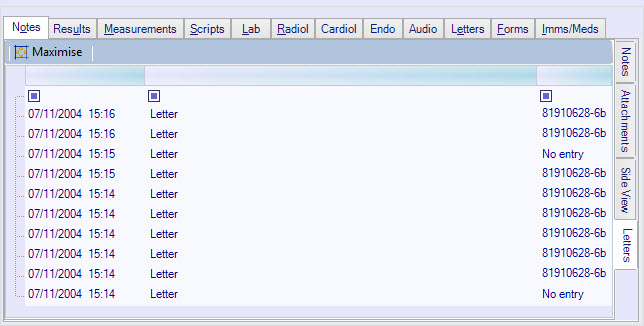
Reviewing Letters
Move to the
Notes
tab at the bottom of the clinical notes screen.
To view letters that you have created, move to the
right-hand
side
Letters
tab.
Double click on a letter to open it in another window.
Other Options
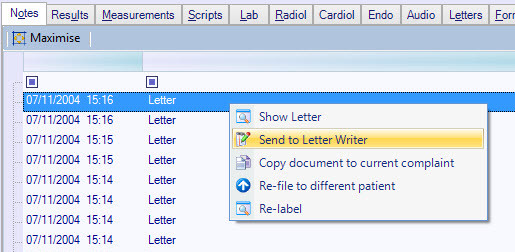
Right-click on a letter for more options:
Show Letter
: opens the letter in a new window
Send to Letter Writer
: places the contents into the current letter writer. You can then modify it and re-address it to other recipients.
Copy document to the current complaint
: adds the letter to your current complaint, as an attachment. You will be able to edit the contents.
Re-file to a different patient
: allows you to reassign the letter to a different patient.
Re-Label
: allows you to change the label (description) of the item. This is the description that appears in your list of clinical notes.